OIDC (OpenID Connect)
What is OIDC (OpenID Connect)?
OIDC (OpenID Connect) is an authentication protocol built on top of OAuth 2.0.
It enables secure login (authentication) using tokens and supports modern applications like SPAs, mobile apps, APIs, etc.
It is JSON-based (unlike SAML, which is XML-based).
OIDC = OAuth 2.0 + ID Layer
OAuth 2.0 = Authorization (access resources)
OIDC = Adds Authentication (who is the user?)
Why Do We Use OIDC?
| Reason | Explanation | | --- | --- | | 🔐 Secure Login (SSO) | OIDC provides a standard way to authenticate users using tokens (ID tokens + access tokens) | | 🔑 Modern Apps Support | Ideal for SPAs, mobile apps, APIs (unlike SAML which is more web form-based) | | 📱 Token-Based Login | Uses JWT (JSON Web Tokens), suitable for stateless environments | | 🌐 Federated Identity | Let users log in via Google, Microsoft, GitHub, etc. | | 🔧 Easy Integration | Works with OAuth providers like Okta, Auth0, Azure AD, AWS Cognito |
Where Is OIDC Used?
| Use Case | Example | | --- | --- | | 🌐 Web App SSO | Login to a dashboard using Google login (OIDC) | | 📱 Mobile App Auth | Apps like Uber or Spotify authenticate via OIDC with Facebook/Google | | 🔐 API Gateway | OIDC is used to authorize API calls by validating tokens | | 🧑💼 Enterprise Login | Internal apps use OIDC to authenticate against Azure AD or Okta |
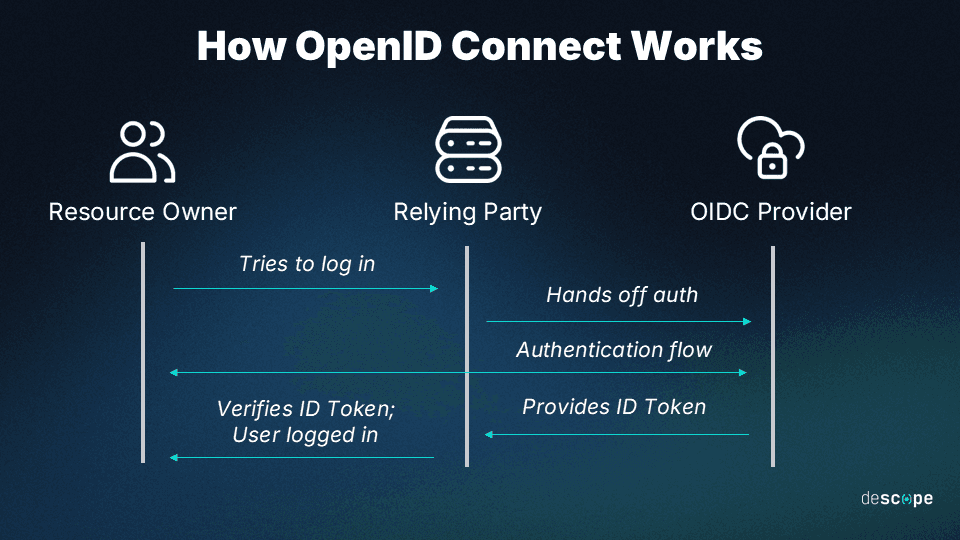
How OIDC Works (Simplified Flow)
User clicks Login with Google
Browser redirects to Google (IdP)
User authenticates with Google
Google sends ID Token and Access Token back to your app
Your app verifies the ID Token (JWT) and creates a session
Practice Approach (Lab Environment)
🛠️ Tools You Can Use
Identity Providers (IdP):
Google Developer Console
Auth0 (Free Tier)
Azure AD / Okta Developer Account
Apps:
Node.js or Flask App (OIDC Client)
Postman or Curl to test token exchange
React / SPA App (optional)
Real-Life Project: OIDC Login with Google in a Web App
Scenario:
You have a web app and want users to log in using Google. You don’t want to handle passwords — just use OIDC to authenticate.
Step-by-Step Setup
✅ Step 1: Register Your App with Google (IdP)
Go to https://console.developers.google.com
Create a new project
Enable “Google+ API” and “OAuth Consent Screen”
Register your app’s redirect URI (e.g.,
http://localhost:3000/callback)Copy Client ID and Client Secret
✅ Step 2: Create Your Web App (OIDC Client)
Use a simple Node.js/Flask app with OIDC client library:
Node.js: Use
passport-openidconnectPython: Use
authliborflask-oidc
    pythonCopyEdit# Sample Flask OIDC snippet
    from flask import Flask, redirect, url_for
    from authlib.integrations.flask_client import OAuth

    app = Flask(__name__)
    oauth = OAuth(app)
    google = oauth.register(
        name='google',
        client_id='YOUR_CLIENT_ID',
        client_secret='YOUR_SECRET',
        server_metadata_url='https://accounts.google.com/.well-known/openid-configuration',
        client_kwargs={'scope': 'openid email profile'}
    )

    @app.route('/')
    def home():
        return 'Hello! <a href="/login">Login with Google</a>'

    @app.route('/login')
    def login():
        return google.authorize_redirect(redirect_uri='/callback')

    @app.route('/callback')
    def callback():
        token = google.authorize_access_token()
        user = google.parse_id_token(token)
        return f'Hello {user["email"]}'
✅ Step 3: Test the Flow
Run the app (
localhost:5000)Click "Login with Google"
Redirects to Google Login
On success, you’ll see your email (pulled from ID Token)
✅ Step 4: Decode and Verify the ID Token
Use jwt.io to decode the token
Validate issuer (
iss), subject (sub), audience (aud), expiry (exp)
✅ Step 5: Security Considerations
Store tokens securely
Use HTTPS in production
Set short expiry time for tokens
Implement token revocation or refresh tokens
Interview-Ready Summary (Say This)
OIDC is a modern protocol used for authentication, built on top of OAuth 2.0.
In my lab, I implemented login with Google (OIDC provider) using a simple Flask web app.
The app sends users to Google for login, receives a JWT-based ID Token, and uses that to authenticate users securely without handling passwords.
Interview Questions and How to Answer:
1. What is OIDC and how is it different from OAuth 2.0?
Answer:
OIDC is an identity layer on top of OAuth 2.0. OAuth 2.0 provides access delegation (authorization), but OIDC adds user authentication and identity tokens (ID Token) to confirm who the user is.
2. What is an ID Token?
Answer:
An ID token is a JWT that contains claims about the user (e.g., email, name, sub). It is issued by the identity provider and is used to verify the user’s identity.
3. What are scopes in OIDC?
Answer:
OIDC requires the openid scope. Other scopes include email, profile, and address. These define what identity info will be returned in the ID token.
4. How is the ID token validated?
Answer:
The application validates the JWT signature, ensures the audience (aud) and issuer (iss) match, and checks expiration (exp).
5. Where do you use OIDC in your project?
Answer Example:
In my recent project, we used OIDC to allow users to log in via Microsoft Azure AD. It simplified identity management, ensured secure login, and enabled single sign-on across our internal applications.